ZeroClaw 🦀
Zero overhead. Zero compromise. 100% Rust. 100% Agnostic.
⚡️ Runs on $10 hardware with <5MB RAM: That's 99% less memory than OpenClaw and 98% cheaper than a Mac mini!


Fast, small, and fully autonomous AI assistant infrastructure — deploy anywhere, swap anything.
```
~3.4MB binary · <10ms startup · 1,017 tests · 23+ providers · 8 traits · Pluggable everything
```
### ✨ Features
- 🏎️ **Ultra-Lightweight:** <5MB Memory footprint — 99% smaller than OpenClaw core.
- 💰 **Minimal Cost:** Efficient enough to run on $10 Hardware — 98% cheaper than a Mac mini.
- ⚡ **Lightning Fast:** 400X Faster startup time, boot in <10ms (under 1s even on 0.6GHz cores).
- 🌍 **True Portability:** Single self-contained binary across ARM, x86, and RISC-V.
### Why teams pick ZeroClaw
- **Lean by default:** small Rust binary, fast startup, low memory footprint.
- **Secure by design:** pairing, strict sandboxing, explicit allowlists, workspace scoping.
- **Fully swappable:** core systems are traits (providers, channels, tools, memory, tunnels).
- **No lock-in:** OpenAI-compatible provider support + pluggable custom endpoints.
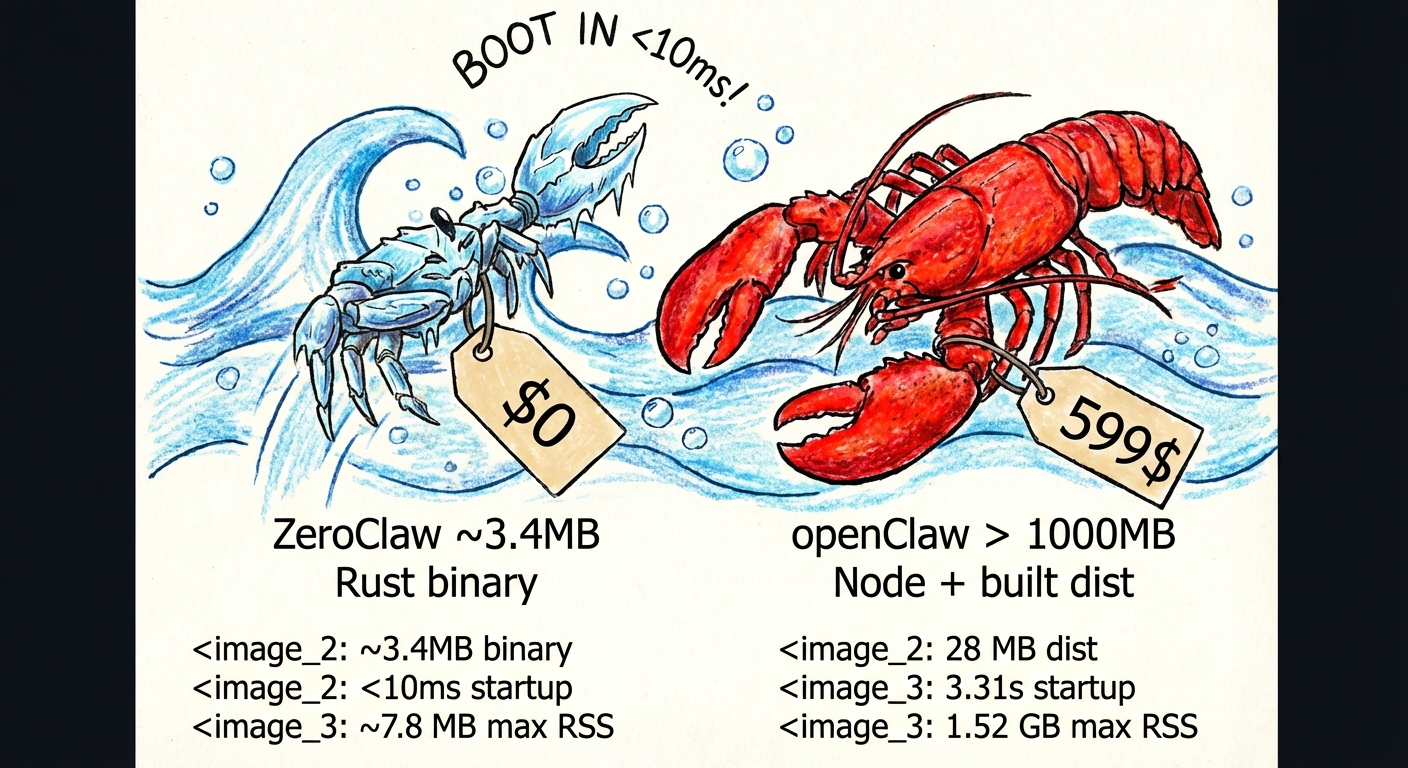
## Benchmark Snapshot (ZeroClaw vs OpenClaw)
Local machine quick benchmark (macOS arm64, Feb 2026) normalized for 0.8GHz edge hardware.
| | OpenClaw | NanoBot | PicoClaw | ZeroClaw 🦀 |
|---|---|---|---|---|
| **Language** | TypeScript | Python | Go | **Rust** |
| **RAM** | > 1GB | > 100MB | < 10MB | **< 5MB** |
| **Startup (0.8GHz core)** | > 500s | > 30s | < 1s | **< 10ms** |
| **Binary Size** | ~28MB (dist) | N/A (Scripts) | ~8MB | **3.4 MB** |
| **Cost** | Mac Mini $599 | Linux SBC ~$50 | Linux Board $10 | **Any hardware $10** |
> Notes: ZeroClaw results measured with `/usr/bin/time -l` on release builds. OpenClaw requires Node.js runtime (~390MB overhead). PicoClaw and ZeroClaw are static binaries.
Reproduce ZeroClaw numbers locally:
```bash
cargo build --release
ls -lh target/release/zeroclaw
/usr/bin/time -l target/release/zeroclaw --help
/usr/bin/time -l target/release/zeroclaw status
```
## Prerequisites
Windows
#### Required
1. **Visual Studio Build Tools** (provides the MSVC linker and Windows SDK):
```powershell
winget install Microsoft.VisualStudio.2022.BuildTools
```
During installation (or via the Visual Studio Installer), select the **"Desktop development with C++"** workload.
2. **Rust toolchain:**
```powershell
winget install Rustlang.Rustup
```
After installation, open a new terminal and run `rustup default stable` to ensure the stable toolchain is active.
3. **Verify** both are working:
```powershell
rustc --version
cargo --version
```
#### Optional
- **Docker Desktop** — required only if using the [Docker sandboxed runtime](#runtime-support-current) (`runtime.kind = "docker"`). Install via `winget install Docker.DockerDesktop`.
Linux / macOS
#### Required
1. **Build essentials:**
- **Linux (Debian/Ubuntu):** `sudo apt install build-essential pkg-config`
- **Linux (Fedora/RHEL):** `sudo dnf groupinstall "Development Tools" && sudo dnf install pkg-config`
- **macOS:** Install Xcode Command Line Tools: `xcode-select --install`
2. **Rust toolchain:**
```bash
curl --proto '=https' --tlsv1.2 -sSf https://sh.rustup.rs | sh
```
See [rustup.rs](https://rustup.rs) for details.
3. **Verify** both are working:
```bash
rustc --version
cargo --version
```
#### Optional
- **Docker** — required only if using the [Docker sandboxed runtime](#runtime-support-current) (`runtime.kind = "docker"`). Install via your package manager or [docker.com](https://docs.docker.com/engine/install/).
> **Note:** The default `cargo build --release` uses `codegen-units=1` for compatibility with low-memory devices (e.g., Raspberry Pi 3 with 1GB RAM). For faster builds on powerful machines, use `cargo build --profile release-fast`.
## Quick Start
```bash
git clone https://github.com/zeroclaw-labs/zeroclaw.git
cd zeroclaw
cargo build --release --locked
cargo install --path . --force --locked
# Ensure ~/.cargo/bin is in your PATH
export PATH="$HOME/.cargo/bin:$PATH"
# Quick setup (no prompts)
zeroclaw onboard --api-key sk-... --provider openrouter
# Or interactive wizard
zeroclaw onboard --interactive
# Or quickly repair channels/allowlists only
zeroclaw onboard --channels-only
# Chat
zeroclaw agent -m "Hello, ZeroClaw!"
# Interactive mode
zeroclaw agent
# Start the gateway (webhook server)
zeroclaw gateway # default: 127.0.0.1:8080
zeroclaw gateway --port 0 # random port (security hardened)
# Start full autonomous runtime
zeroclaw daemon
# Check status
zeroclaw status
# Run system diagnostics
zeroclaw doctor
# Check channel health
zeroclaw channel doctor
# Bind a Telegram identity into allowlist
zeroclaw channel bind-telegram 123456789
# Get integration setup details
zeroclaw integrations info Telegram
# Manage background service
zeroclaw service install
zeroclaw service status
# Migrate memory from OpenClaw (safe preview first)
zeroclaw migrate openclaw --dry-run
zeroclaw migrate openclaw
```
> **Dev fallback (no global install):** prefix commands with `cargo run --release --` (example: `cargo run --release -- status`).
## Architecture
Every subsystem is a **trait** — swap implementations with a config change, zero code changes.
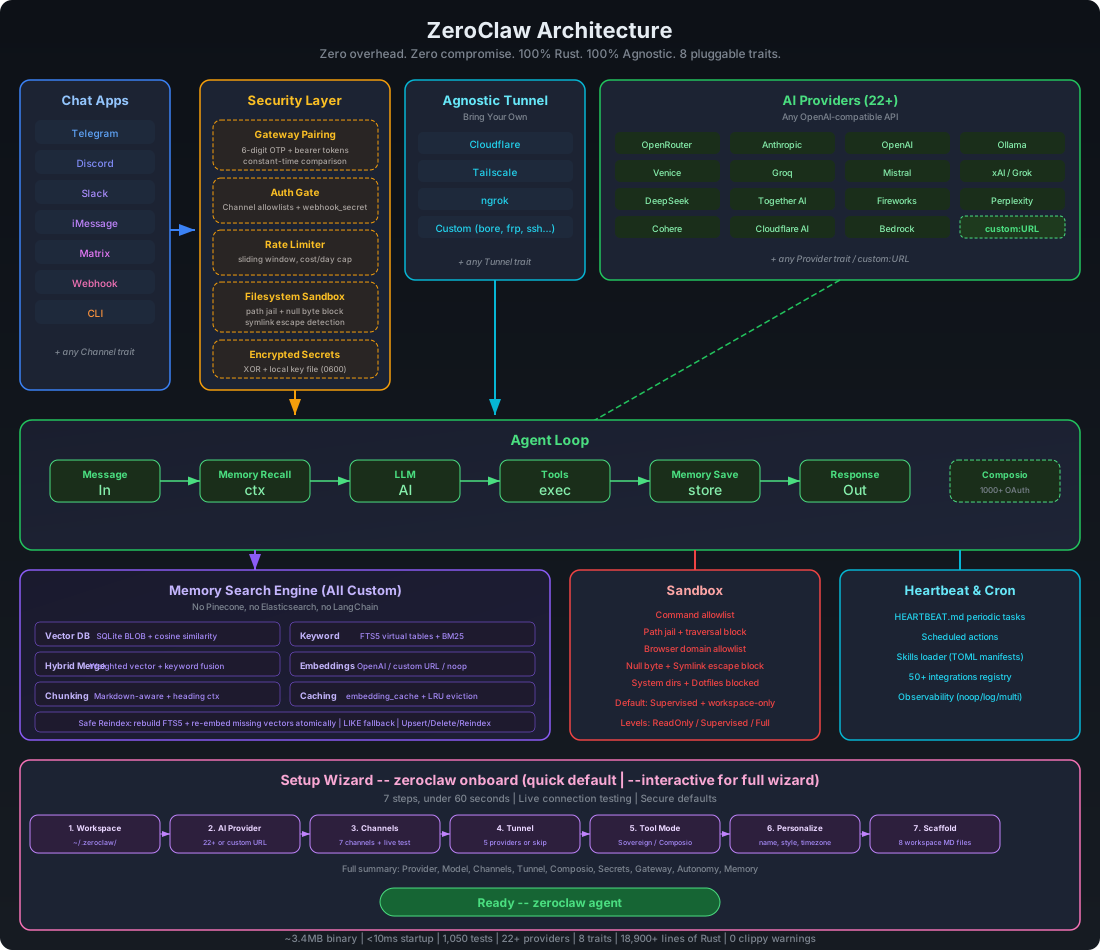
| Subsystem | Trait | Ships with | Extend |
|-----------|-------|------------|--------|
| **AI Models** | `Provider` | 23+ providers (OpenRouter, Anthropic, OpenAI, Ollama, Venice, Groq, Mistral, xAI, DeepSeek, Together, Fireworks, Perplexity, Cohere, Bedrock, Astrai, etc.) | `custom:https://your-api.com` — any OpenAI-compatible API |
| **Channels** | `Channel` | CLI, Telegram, Discord, Slack, Mattermost, iMessage, Matrix, WhatsApp, Webhook | Any messaging API |
| **Memory** | `Memory` | SQLite with hybrid search (FTS5 + vector cosine similarity), Lucid bridge (CLI sync + SQLite fallback), Markdown | Any persistence backend |
| **Tools** | `Tool` | shell, file_read, file_write, memory_store, memory_recall, memory_forget, browser_open (Brave + allowlist), browser (agent-browser / rust-native), composio (optional) | Any capability |
| **Observability** | `Observer` | Noop, Log, Multi | Prometheus, OTel |
| **Runtime** | `RuntimeAdapter` | Native, Docker (sandboxed) | WASM (planned; unsupported kinds fail fast) |
| **Security** | `SecurityPolicy` | Gateway pairing, sandbox, allowlists, rate limits, filesystem scoping, encrypted secrets | — |
| **Identity** | `IdentityConfig` | OpenClaw (markdown), AIEOS v1.1 (JSON) | Any identity format |
| **Tunnel** | `Tunnel` | None, Cloudflare, Tailscale, ngrok, Custom | Any tunnel binary |
| **Heartbeat** | Engine | HEARTBEAT.md periodic tasks | — |
| **Skills** | Loader | TOML manifests + SKILL.md instructions | Community skill packs |
| **Integrations** | Registry | 50+ integrations across 9 categories | Plugin system |
### Runtime support (current)
- ✅ Supported today: `runtime.kind = "native"` or `runtime.kind = "docker"`
- 🚧 Planned, not implemented yet: WASM / edge runtimes
When an unsupported `runtime.kind` is configured, ZeroClaw now exits with a clear error instead of silently falling back to native.
### Memory System (Full-Stack Search Engine)
All custom, zero external dependencies — no Pinecone, no Elasticsearch, no LangChain:
| Layer | Implementation |
|-------|---------------|
| **Vector DB** | Embeddings stored as BLOB in SQLite, cosine similarity search |
| **Keyword Search** | FTS5 virtual tables with BM25 scoring |
| **Hybrid Merge** | Custom weighted merge function (`vector.rs`) |
| **Embeddings** | `EmbeddingProvider` trait — OpenAI, custom URL, or noop |
| **Chunking** | Line-based markdown chunker with heading preservation |
| **Caching** | SQLite `embedding_cache` table with LRU eviction |
| **Safe Reindex** | Rebuild FTS5 + re-embed missing vectors atomically |
The agent automatically recalls, saves, and manages memory via tools.
```toml
[memory]
backend = "sqlite" # "sqlite", "lucid", "markdown", "none"
auto_save = true
embedding_provider = "openai"
vector_weight = 0.7
keyword_weight = 0.3
# backend = "none" uses an explicit no-op memory backend (no persistence)
# Optional for backend = "lucid"
# ZEROCLAW_LUCID_CMD=/usr/local/bin/lucid # default: lucid
# ZEROCLAW_LUCID_BUDGET=200 # default: 200
# ZEROCLAW_LUCID_LOCAL_HIT_THRESHOLD=3 # local hit count to skip external recall
# ZEROCLAW_LUCID_RECALL_TIMEOUT_MS=120 # low-latency budget for lucid context recall
# ZEROCLAW_LUCID_STORE_TIMEOUT_MS=800 # async sync timeout for lucid store
# ZEROCLAW_LUCID_FAILURE_COOLDOWN_MS=15000 # cooldown after lucid failure to avoid repeated slow attempts
```
## Security
ZeroClaw enforces security at **every layer** — not just the sandbox. It passes all items from the community security checklist.
### Security Checklist
| # | Item | Status | How |
|---|------|--------|-----|
| 1 | **Gateway not publicly exposed** | ✅ | Binds `127.0.0.1` by default. Refuses `0.0.0.0` without tunnel or explicit `allow_public_bind = true`. |
| 2 | **Pairing required** | ✅ | 6-digit one-time code on startup. Exchange via `POST /pair` for bearer token. All `/webhook` requests require `Authorization: Bearer `. |
| 3 | **Filesystem scoped (no /)** | ✅ | `workspace_only = true` by default. 14 system dirs + 4 sensitive dotfiles blocked. Null byte injection blocked. Symlink escape detection via canonicalization + resolved-path workspace checks in file read/write tools. |
| 4 | **Access via tunnel only** | ✅ | Gateway refuses public bind without active tunnel. Supports Tailscale, Cloudflare, ngrok, or any custom tunnel. |
> **Run your own nmap:** `nmap -p 1-65535 ` — ZeroClaw binds to localhost only, so nothing is exposed unless you explicitly configure a tunnel.
### Channel allowlists (Telegram / Discord / Slack / Mattermost)
Inbound sender policy is now consistent:
- Empty allowlist = **deny all inbound messages**
- `"*"` = **allow all** (explicit opt-in)
- Otherwise = exact-match allowlist
This keeps accidental exposure low by default.
Recommended low-friction setup (secure + fast):
- **Telegram:** allowlist your own `@username` (without `@`) and/or your numeric Telegram user ID.
- **Discord:** allowlist your own Discord user ID.
- **Slack:** allowlist your own Slack member ID (usually starts with `U`).
- **Mattermost:** uses standard API v4. Allowlists use Mattermost user IDs.
- Use `"*"` only for temporary open testing.
Telegram operator-approval flow:
1. Keep `[channels_config.telegram].allowed_users = []` for deny-by-default startup.
2. Unauthorized users receive a hint with a copyable operator command:
`zeroclaw channel bind-telegram `.
3. Operator runs that command locally, then user retries sending a message.
If you need a one-shot manual approval, run:
```bash
zeroclaw channel bind-telegram 123456789
```
If you're not sure which identity to use:
1. Start channels and send one message to your bot.
2. Read the warning log to see the exact sender identity.
3. Add that value to the allowlist and rerun channels-only setup.
If you hit authorization warnings in logs (for example: `ignoring message from unauthorized user`),
rerun channel setup only:
```bash
zeroclaw onboard --channels-only
```
### Telegram media replies
Telegram routing now replies to the source **chat ID** from incoming updates (instead of usernames),
which avoids `Bad Request: chat not found` failures.
For non-text replies, ZeroClaw can send Telegram attachments when the assistant includes markers:
- `[IMAGE:]`
- `[DOCUMENT:]`
- `[VIDEO:]`
- `[AUDIO:]`
- `[VOICE:]`
Paths can be local files (for example `/tmp/screenshot.png`) or HTTPS URLs.
### WhatsApp Business Cloud API Setup
WhatsApp uses Meta's Cloud API with webhooks (push-based, not polling):
1. **Create a Meta Business App:**
- Go to [developers.facebook.com](https://developers.facebook.com)
- Create a new app → Select "Business" type
- Add the "WhatsApp" product
2. **Get your credentials:**
- **Access Token:** From WhatsApp → API Setup → Generate token (or create a System User for permanent tokens)
- **Phone Number ID:** From WhatsApp → API Setup → Phone number ID
- **Verify Token:** You define this (any random string) — Meta will send it back during webhook verification
3. **Configure ZeroClaw:**
```toml
[channels_config.whatsapp]
access_token = "EAABx..."
phone_number_id = "123456789012345"
verify_token = "my-secret-verify-token"
allowed_numbers = ["+1234567890"] # E.164 format, or ["*"] for all
```
4. **Start the gateway with a tunnel:**
```bash
zeroclaw gateway --port 8080
```
WhatsApp requires HTTPS, so use a tunnel (ngrok, Cloudflare, Tailscale Funnel).
5. **Configure Meta webhook:**
- In Meta Developer Console → WhatsApp → Configuration → Webhook
- **Callback URL:** `https://your-tunnel-url/whatsapp`
- **Verify Token:** Same as your `verify_token` in config
- Subscribe to `messages` field
6. **Test:** Send a message to your WhatsApp Business number — ZeroClaw will respond via the LLM.
## Configuration
Config: `~/.zeroclaw/config.toml` (created by `onboard`)
```toml
api_key = "sk-..."
default_provider = "openrouter"
default_model = "anthropic/claude-sonnet-4-20250514"
default_temperature = 0.7
[memory]
backend = "sqlite" # "sqlite", "lucid", "markdown", "none"
auto_save = true
embedding_provider = "openai" # "openai", "noop"
vector_weight = 0.7
keyword_weight = 0.3
# backend = "none" disables persistent memory via no-op backend
[gateway]
require_pairing = true # require pairing code on first connect
allow_public_bind = false # refuse 0.0.0.0 without tunnel
[autonomy]
level = "supervised" # "readonly", "supervised", "full" (default: supervised)
workspace_only = true # default: true — scoped to workspace
allowed_commands = ["git", "npm", "cargo", "ls", "cat", "grep"]
forbidden_paths = ["/etc", "/root", "/proc", "/sys", "~/.ssh", "~/.gnupg", "~/.aws"]
[runtime]
kind = "native" # "native" or "docker"
[runtime.docker]
image = "alpine:3.20" # container image for shell execution
network = "none" # docker network mode ("none", "bridge", etc.)
memory_limit_mb = 512 # optional memory limit in MB
cpu_limit = 1.0 # optional CPU limit
read_only_rootfs = true # mount root filesystem as read-only
mount_workspace = true # mount workspace into /workspace
allowed_workspace_roots = [] # optional allowlist for workspace mount validation
[heartbeat]
enabled = false
interval_minutes = 30
[tunnel]
provider = "none" # "none", "cloudflare", "tailscale", "ngrok", "custom"
[secrets]
encrypt = true # API keys encrypted with local key file
[browser]
enabled = false # opt-in browser_open + browser tools
allowed_domains = ["docs.rs"] # required when browser is enabled
backend = "agent_browser" # "agent_browser" (default), "rust_native", "computer_use", "auto"
native_headless = true # applies when backend uses rust-native
native_webdriver_url = "http://127.0.0.1:9515" # WebDriver endpoint (chromedriver/selenium)
# native_chrome_path = "/usr/bin/chromium" # optional explicit browser binary for driver
[browser.computer_use]
endpoint = "http://127.0.0.1:8787/v1/actions" # computer-use sidecar HTTP endpoint
timeout_ms = 15000 # per-action timeout
allow_remote_endpoint = false # secure default: only private/localhost endpoint
window_allowlist = [] # optional window title/process allowlist hints
# api_key = "..." # optional bearer token for sidecar
# max_coordinate_x = 3840 # optional coordinate guardrail
# max_coordinate_y = 2160 # optional coordinate guardrail
# Rust-native backend build flag:
# cargo build --release --features browser-native
# Ensure a WebDriver server is running, e.g. chromedriver --port=9515
# Computer-use sidecar contract (MVP)
# POST browser.computer_use.endpoint
# Request: {
# "action": "mouse_click",
# "params": {"x": 640, "y": 360, "button": "left"},
# "policy": {"allowed_domains": [...], "window_allowlist": [...], "max_coordinate_x": 3840, "max_coordinate_y": 2160},
# "metadata": {"session_name": "...", "source": "zeroclaw.browser", "version": "..."}
# }
# Response: {"success": true, "data": {...}} or {"success": false, "error": "..."}
[composio]
enabled = false # opt-in: 1000+ OAuth apps via composio.dev
# api_key = "cmp_..." # optional: stored encrypted when [secrets].encrypt = true
entity_id = "default" # default user_id for Composio tool calls
[identity]
format = "openclaw" # "openclaw" (default, markdown files) or "aieos" (JSON)
# aieos_path = "identity.json" # path to AIEOS JSON file (relative to workspace or absolute)
# aieos_inline = '{"identity":{"names":{"first":"Nova"}}}' # inline AIEOS JSON
```
### Ollama Local and Remote Endpoints
ZeroClaw uses one provider key (`ollama`) for both local and remote Ollama deployments:
- Local Ollama: keep `api_url` unset, run `ollama serve`, and use models like `llama3.2`.
- Remote Ollama endpoint (including Ollama Cloud): set `api_url` to the remote endpoint and set `api_key` (or `OLLAMA_API_KEY`) when required.
- Optional `:cloud` suffix: model IDs like `qwen3:cloud` are normalized to `qwen3` before the request.
Example remote configuration:
```toml
default_provider = "ollama"
default_model = "qwen3:cloud"
api_url = "https://ollama.com"
api_key = "ollama_api_key_here"
```
## Python Companion Package (`zeroclaw-tools`)
For LLM providers with inconsistent native tool calling (e.g., GLM-5/Zhipu), ZeroClaw ships a Python companion package with **LangGraph-based tool calling** for guaranteed consistency:
```bash
pip install zeroclaw-tools
```
```python
from zeroclaw_tools import create_agent, shell, file_read
from langchain_core.messages import HumanMessage
# Works with any OpenAI-compatible provider
agent = create_agent(
tools=[shell, file_read],
model="glm-5",
api_key="your-key",
base_url="https://api.z.ai/api/coding/paas/v4"
)
result = await agent.ainvoke({
"messages": [HumanMessage(content="List files in /tmp")]
})
print(result["messages"][-1].content)
```
**Why use it:**
- **Consistent tool calling** across all providers (even those with poor native support)
- **Automatic tool loop** — keeps calling tools until the task is complete
- **Easy extensibility** — add custom tools with `@tool` decorator
- **Discord bot integration** included (Telegram planned)
See [`python/README.md`](python/README.md) for full documentation.
## Identity System (AIEOS Support)
ZeroClaw supports **identity-agnostic** AI personas through two formats:
### OpenClaw (Default)
Traditional markdown files in your workspace:
- `IDENTITY.md` — Who the agent is
- `SOUL.md` — Core personality and values
- `USER.md` — Who the agent is helping
- `AGENTS.md` — Behavior guidelines
### AIEOS (AI Entity Object Specification)
[AIEOS](https://aieos.org) is a standardization framework for portable AI identity. ZeroClaw supports AIEOS v1.1 JSON payloads, allowing you to:
- **Import identities** from the AIEOS ecosystem
- **Export identities** to other AIEOS-compatible systems
- **Maintain behavioral integrity** across different AI models
#### Enable AIEOS
```toml
[identity]
format = "aieos"
aieos_path = "identity.json" # relative to workspace or absolute path
```
Or inline JSON:
```toml
[identity]
format = "aieos"
aieos_inline = '''
{
"identity": {
"names": { "first": "Nova", "nickname": "N" }
},
"psychology": {
"neural_matrix": { "creativity": 0.9, "logic": 0.8 },
"traits": { "mbti": "ENTP" },
"moral_compass": { "alignment": "Chaotic Good" }
},
"linguistics": {
"text_style": { "formality_level": 0.2, "slang_usage": true }
},
"motivations": {
"core_drive": "Push boundaries and explore possibilities"
}
}
'''
```
#### AIEOS Schema Sections
| Section | Description |
|---------|-------------|
| `identity` | Names, bio, origin, residence |
| `psychology` | Neural matrix (cognitive weights), MBTI, OCEAN, moral compass |
| `linguistics` | Text style, formality, catchphrases, forbidden words |
| `motivations` | Core drive, short/long-term goals, fears |
| `capabilities` | Skills and tools the agent can access |
| `physicality` | Visual descriptors for image generation |
| `history` | Origin story, education, occupation |
| `interests` | Hobbies, favorites, lifestyle |
See [aieos.org](https://aieos.org) for the full schema and live examples.
## Gateway API
| Endpoint | Method | Auth | Description |
|----------|--------|------|-------------|
| `/health` | GET | None | Health check (always public, no secrets leaked) |
| `/pair` | POST | `X-Pairing-Code` header | Exchange one-time code for bearer token |
| `/webhook` | POST | `Authorization: Bearer ` | Send message: `{"message": "your prompt"}` |
| `/whatsapp` | GET | Query params | Meta webhook verification (hub.mode, hub.verify_token, hub.challenge) |
| `/whatsapp` | POST | None (Meta signature) | WhatsApp incoming message webhook |
## Commands
| Command | Description |
|---------|-------------|
| `onboard` | Quick setup (default) |
| `onboard --interactive` | Full interactive 7-step wizard |
| `onboard --channels-only` | Reconfigure channels/allowlists only (fast repair flow) |
| `agent -m "..."` | Single message mode |
| `agent` | Interactive chat mode |
| `gateway` | Start webhook server (default: `127.0.0.1:8080`) |
| `gateway --port 0` | Random port mode |
| `daemon` | Start long-running autonomous runtime |
| `service install/start/stop/status/uninstall` | Manage user-level background service |
| `doctor` | Diagnose daemon/scheduler/channel freshness |
| `status` | Show full system status |
| `channel doctor` | Run health checks for configured channels |
| `channel bind-telegram ` | Add one Telegram username/user ID to allowlist |
| `integrations info ` | Show setup/status details for one integration |
## Development
```bash
cargo build # Dev build
cargo build --release # Release build (codegen-units=1, works on all devices including Raspberry Pi)
cargo build --profile release-fast # Faster build (codegen-units=8, requires 16GB+ RAM)
cargo test # 1,017 tests
cargo clippy # Lint (0 warnings)
cargo fmt # Format
# Run the SQLite vs Markdown benchmark
cargo test --test memory_comparison -- --nocapture
```
### Pre-push hook
A git hook runs `cargo fmt --check`, `cargo clippy -- -D warnings`, and `cargo test` before every push. Enable it once:
```bash
git config core.hooksPath .githooks
```
### Build troubleshooting (Linux OpenSSL errors)
If you see an `openssl-sys` build error, sync dependencies and rebuild with the repository lockfile:
```bash
git pull
cargo build --release --locked
cargo install --path . --force --locked
```
ZeroClaw is configured to use `rustls` for HTTP/TLS dependencies; `--locked` keeps the transitive graph deterministic on fresh environments.
To skip the hook when you need a quick push during development:
```bash
git push --no-verify
```
## Collaboration & Docs
For high-throughput collaboration and consistent reviews:
- Contribution guide: [CONTRIBUTING.md](CONTRIBUTING.md)
- PR workflow policy: [docs/pr-workflow.md](docs/pr-workflow.md)
- Reviewer playbook (triage + deep review): [docs/reviewer-playbook.md](docs/reviewer-playbook.md)
- CI ownership and triage map: [docs/ci-map.md](docs/ci-map.md)
- Security disclosure policy: [SECURITY.md](SECURITY.md)
### 🙏 Special Thanks
A heartfelt thank you to the communities and institutions that inspire and fuel this open-source work:
- **Harvard University** — for fostering intellectual curiosity and pushing the boundaries of what's possible.
- **MIT** — for championing open knowledge, open source, and the belief that technology should be accessible to everyone.
- **Sundai Club** — for the community, the energy, and the relentless drive to build things that matter.
- **The World & Beyond** 🌍✨ — to every contributor, dreamer, and builder out there making open source a force for good. This is for you.
We're building in the open because the best ideas come from everywhere. If you're reading this, you're part of it. Welcome. 🦀❤️
## License
MIT — see [LICENSE](LICENSE) and [NOTICE](NOTICE) for contributor attribution
## Contributing
See [CONTRIBUTING.md](CONTRIBUTING.md). Implement a trait, submit a PR:
- CI workflow guide: [docs/ci-map.md](docs/ci-map.md)
- New `Provider` → `src/providers/`
- New `Channel` → `src/channels/`
- New `Observer` → `src/observability/`
- New `Tool` → `src/tools/`
- New `Memory` → `src/memory/`
- New `Tunnel` → `src/tunnel/`
- New `Skill` → `~/.zeroclaw/workspace/skills//`
---
**ZeroClaw** — Zero overhead. Zero compromise. Deploy anywhere. Swap anything. 🦀
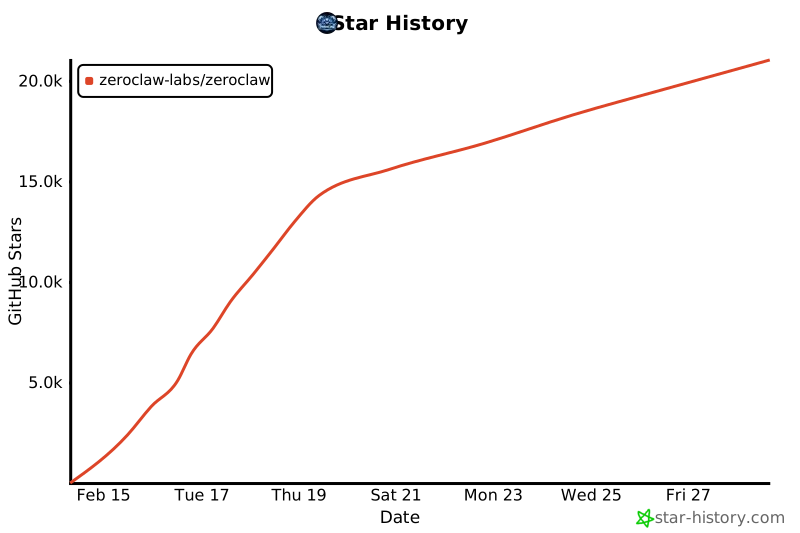
## Star History