 08ea559c21
* ci(docker): allow manual dispatch for publish job * ci(docker): run smoke job on manual dispatch |
||
|---|---|---|
| .cargo | ||
| .gemini | ||
| .githooks | ||
| .github | ||
| benches | ||
| crates/robot-kit | ||
| dev | ||
| docs | ||
| examples | ||
| firmware | ||
| fuzz | ||
| python | ||
| scripts | ||
| src | ||
| test_helpers | ||
| tests | ||
| .coderabbit.yaml | ||
| .dockerignore | ||
| .editorconfig | ||
| .env.example | ||
| .gitattributes | ||
| .gitignore | ||
| .markdownlint-cli2.yaml | ||
| .tmp_todo_probe | ||
| AGENTS.md | ||
| bootstrap.sh | ||
| Cargo.lock | ||
| Cargo.toml | ||
| CHANGELOG.md | ||
| CLAUDE.md | ||
| clippy.toml | ||
| CONTRIBUTING.md | ||
| deny.toml | ||
| docker-compose.yml | ||
| Dockerfile | ||
| LICENSE | ||
| NOTICE | ||
| quick_test.sh | ||
| README.ja.md | ||
| README.md | ||
| README.ru.md | ||
| README.zh-CN.md | ||
| RUN_TESTS.md | ||
| rust-toolchain.toml | ||
| rustfmt.toml | ||
| SECURITY.md | ||
| test_telegram_integration.sh | ||
| TESTING_TELEGRAM.md | ||
| zero-claw.jpeg | ||
| zeroclaw.png | ||


ZeroClaw 🦀
Zero overhead. Zero compromise. 100% Rust. 100% Agnostic.
⚡️ Runs on $10 hardware with <5MB RAM: That's 99% less memory than OpenClaw and 98% cheaper than a Mac mini!



Built by students and members of the Harvard, MIT, and Sundai.Club communities.
🌐 Languages: English · 简体中文 · 日本語 · Русский
Getting Started | One-Click Setup | Docs Hub | Docs TOC
Quick Routes: Reference · Operations · Troubleshoot · Security · Hardware · Contribute
Fast, small, and fully autonomous AI assistant infrastructure
Deploy anywhere. Swap anything.
Trait-driven architecture · secure-by-default runtime · provider/channel/tool swappable · pluggable everything
✨ Features
- 🏎️ Lean Runtime by Default: Common CLI and status workflows run in a few-megabyte memory envelope on release builds.
- 💰 Cost-Efficient Deployment: Designed for low-cost boards and small cloud instances without heavyweight runtime dependencies.
- ⚡ Fast Cold Starts: Single-binary Rust runtime keeps command and daemon startup near-instant for daily operations.
- 🌍 Portable Architecture: One binary-first workflow across ARM, x86, and RISC-V with swappable providers/channels/tools.
Why teams pick ZeroClaw
- Lean by default: small Rust binary, fast startup, low memory footprint.
- Secure by design: pairing, strict sandboxing, explicit allowlists, workspace scoping.
- Fully swappable: core systems are traits (providers, channels, tools, memory, tunnels).
- No lock-in: OpenAI-compatible provider support + pluggable custom endpoints.
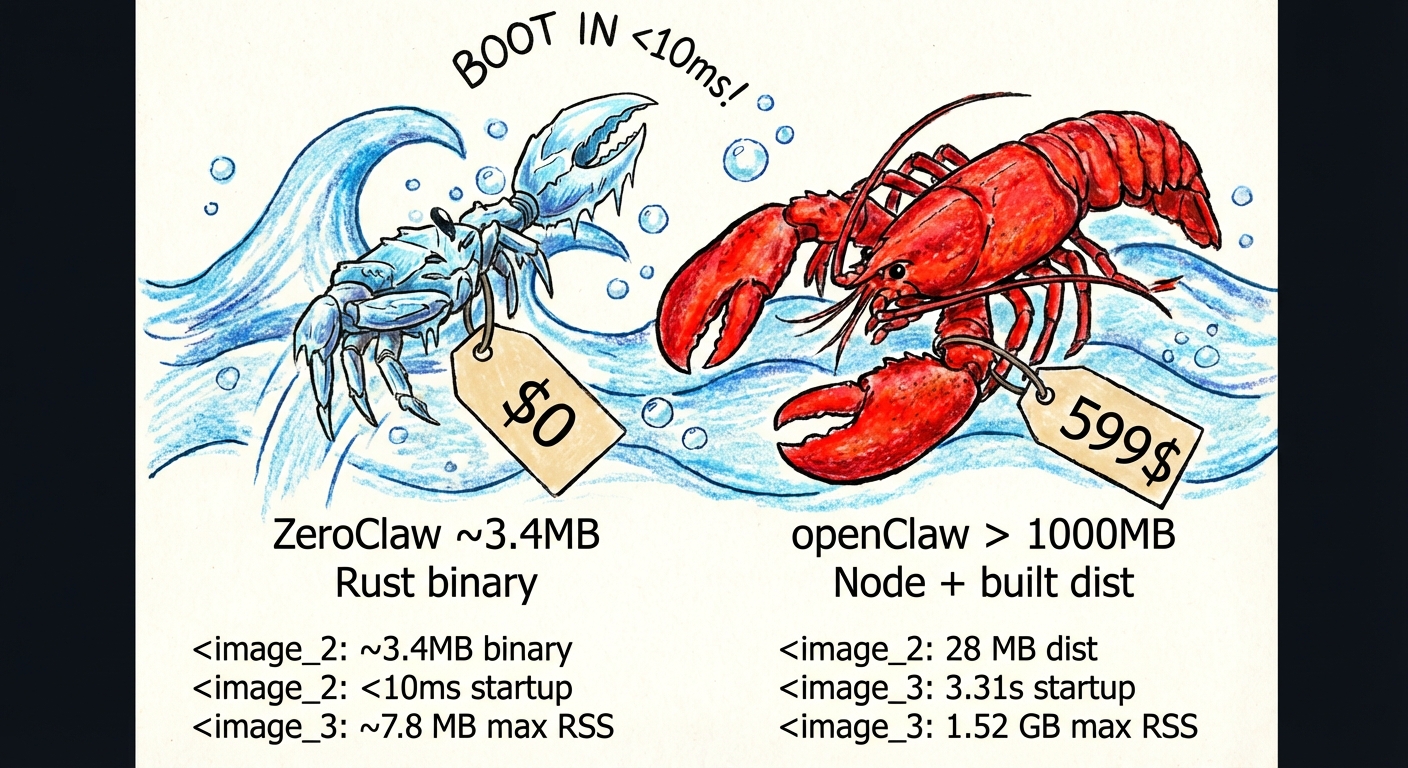
Benchmark Snapshot (ZeroClaw vs OpenClaw, Reproducible)
Local machine quick benchmark (macOS arm64, Feb 2026) normalized for 0.8GHz edge hardware.
| OpenClaw | NanoBot | PicoClaw | ZeroClaw 🦀 | |
|---|---|---|---|---|
| Language | TypeScript | Python | Go | Rust |
| RAM | > 1GB | > 100MB | < 10MB | < 5MB |
| Startup (0.8GHz core) | > 500s | > 30s | < 1s | < 10ms |
| Binary Size | ~28MB (dist) | N/A (Scripts) | ~8MB | 3.4 MB |
| Cost | Mac Mini $599 | Linux SBC ~$50 | Linux Board $10 | Any hardware $10 |
Notes: ZeroClaw results are measured on release builds using
/usr/bin/time -l. OpenClaw requires Node.js runtime (typically ~390MB additional memory overhead), while NanoBot requires Python runtime. PicoClaw and ZeroClaw are static binaries.
Reproducible local measurement
Benchmark claims can drift as code and toolchains evolve, so always measure your current build locally:
cargo build --release
ls -lh target/release/zeroclaw

/usr/bin/time -l target/release/zeroclaw --help
/usr/bin/time -l target/release/zeroclaw status
Example sample (macOS arm64, measured on February 18, 2026):
- Release binary size:
8.8M zeroclaw --help: about0.02sreal time, ~3.9MBpeak memory footprintzeroclaw status: about0.01sreal time, ~4.1MBpeak memory footprint
Prerequisites
Windows
Required
-
Visual Studio Build Tools (provides the MSVC linker and Windows SDK):
winget install Microsoft.VisualStudio.2022.BuildToolsDuring installation (or via the Visual Studio Installer), select the "Desktop development with C++" workload.
-
Rust toolchain:
winget install Rustlang.RustupAfter installation, open a new terminal and run
rustup default stableto ensure the stable toolchain is active. -
Verify both are working:
rustc --version
cargo --version
Optional
- Docker Desktop — required only if using the Docker sandboxed runtime (
runtime.kind = "docker"). Install viawinget install Docker.DockerDesktop.
Linux / macOS
Required
-
Build essentials:
- Linux (Debian/Ubuntu):
sudo apt install build-essential pkg-config - Linux (Fedora/RHEL):
sudo dnf groupinstall "Development Tools" && sudo dnf install pkg-config - macOS: Install Xcode Command Line Tools:
xcode-select --install
- Linux (Debian/Ubuntu):
-
Rust toolchain:
curl --proto '=https' --tlsv1.2 -sSf https://sh.rustup.rs | shSee rustup.rs for details.
-
Verify both are working:
rustc --version
cargo --version
One-Line Installer
Or skip the steps above and install everything (system deps, Rust, ZeroClaw) in a single command:
curl -LsSf https://raw.githubusercontent.com/zeroclaw-labs/zeroclaw/main/scripts/install.sh | bash
Optional
- Docker — required only if using the Docker sandboxed runtime (
runtime.kind = "docker"). Install via your package manager or docker.com.
Note: The default
cargo build --releaseusescodegen-units=1for compatibility with low-memory devices (e.g., Raspberry Pi 3 with 1GB RAM). For faster builds on powerful machines, usecargo build --profile release-fast.
Quick Start
One-click bootstrap
# Recommended: clone then run local bootstrap script
git clone https://github.com/zeroclaw-labs/zeroclaw.git
cd zeroclaw
./bootstrap.sh

# Optional: bootstrap dependencies + Rust on fresh machines
./bootstrap.sh --install-system-deps --install-rust

# Optional: run onboarding in the same flow
./bootstrap.sh --onboard --api-key "sk-..." --provider openrouter
Remote one-liner (review first in security-sensitive environments):
curl -fsSL https://raw.githubusercontent.com/zeroclaw-labs/zeroclaw/main/scripts/bootstrap.sh | bash
Details: docs/one-click-bootstrap.md (toolchain mode may request sudo for system packages).
git clone https://github.com/zeroclaw-labs/zeroclaw.git
cd zeroclaw
cargo build --release --locked
cargo install --path . --force --locked

# Ensure ~/.cargo/bin is in your PATH
export PATH="$HOME/.cargo/bin:$PATH"

# Quick setup (no prompts)
zeroclaw onboard --api-key sk-... --provider openrouter

# Or interactive wizard
zeroclaw onboard --interactive

# Or quickly repair channels/allowlists only
zeroclaw onboard --channels-only

# Chat
zeroclaw agent -m "Hello, ZeroClaw!"

# Interactive mode
zeroclaw agent

# Start the gateway (webhook server)
zeroclaw gateway                # default: 127.0.0.1:3000
zeroclaw gateway --port 0       # random port (security hardened)

# Start full autonomous runtime
zeroclaw daemon

# Check status
zeroclaw status
zeroclaw auth status

# Run system diagnostics
zeroclaw doctor

# Check channel health
zeroclaw channel doctor

# Bind a Telegram identity into allowlist
zeroclaw channel bind-telegram 123456789

# Get integration setup details
zeroclaw integrations info Telegram

# Note: Channels (Telegram, Discord, Slack) require daemon to be running
# zeroclaw daemon

# Manage background service
zeroclaw service install
zeroclaw service status

# Migrate memory from OpenClaw (safe preview first)
zeroclaw migrate openclaw --dry-run
zeroclaw migrate openclaw
Dev fallback (no global install): prefix commands with
cargo run --release --(example:cargo run --release -- status).
Subscription Auth (OpenAI Codex / Claude Code)
ZeroClaw now supports subscription-native auth profiles (multi-account, encrypted at rest).
- Store file:
~/.zeroclaw/auth-profiles.json - Encryption key:
~/.zeroclaw/.secret_key - Profile id format:
<provider>:<profile_name>(example:openai-codex:work)
OpenAI Codex OAuth (ChatGPT subscription):
# Recommended on servers/headless
zeroclaw auth login --provider openai-codex --device-code

# Browser/callback flow with paste fallback
zeroclaw auth login --provider openai-codex --profile default
zeroclaw auth paste-redirect --provider openai-codex --profile default

# Check / refresh / switch profile
zeroclaw auth status
zeroclaw auth refresh --provider openai-codex --profile default
zeroclaw auth use --provider openai-codex --profile work
Claude Code / Anthropic setup-token:
# Paste subscription/setup token (Authorization header mode)
zeroclaw auth paste-token --provider anthropic --profile default --auth-kind authorization

# Alias command
zeroclaw auth setup-token --provider anthropic --profile default
Run the agent with subscription auth:
zeroclaw agent --provider openai-codex -m "hello"
zeroclaw agent --provider openai-codex --auth-profile openai-codex:work -m "hello"

# Anthropic supports both API key and auth token env vars:
# ANTHROPIC_AUTH_TOKEN, ANTHROPIC_OAUTH_TOKEN, ANTHROPIC_API_KEY
zeroclaw agent --provider anthropic -m "hello"
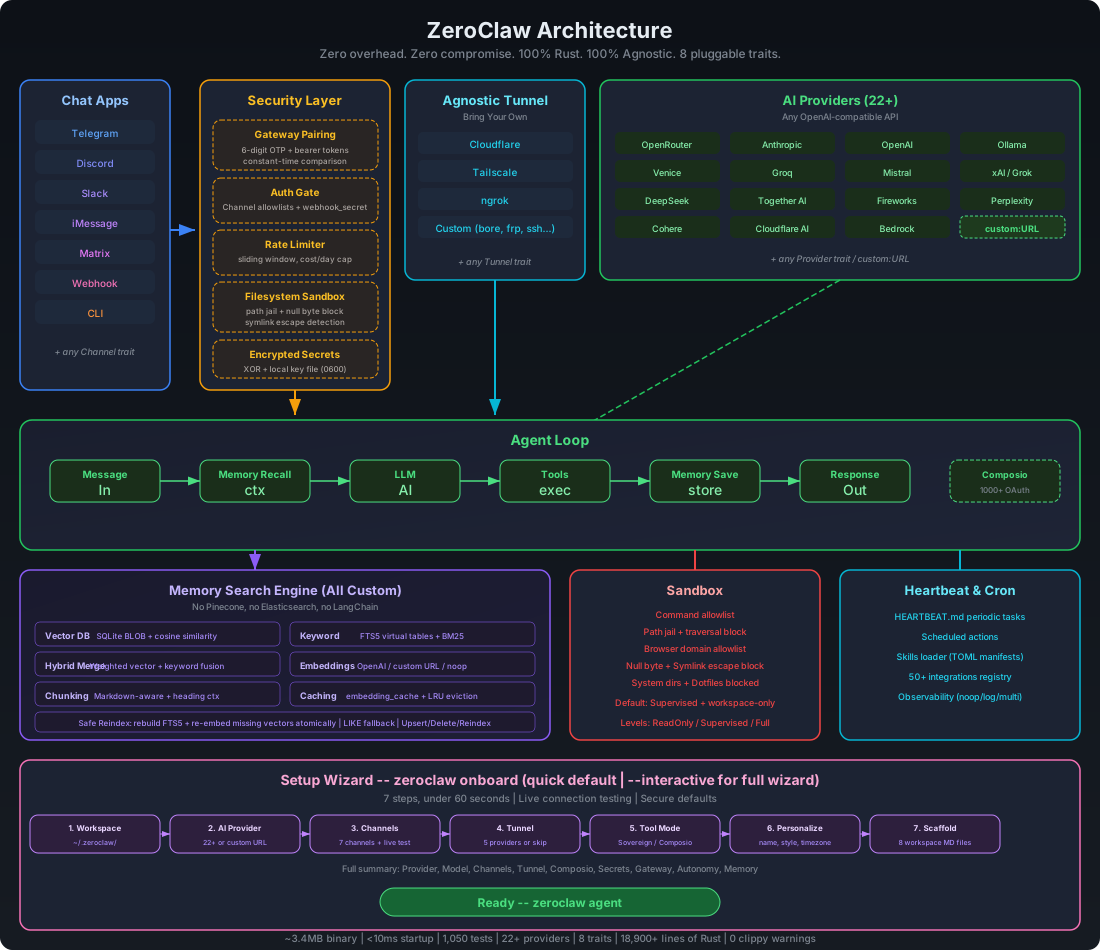
Architecture
Every subsystem is a trait — swap implementations with a config change, zero code changes.
| Subsystem | Trait | Ships with | Extend |
|---|---|---|---|
| AI Models | Provider |
Provider catalog via zeroclaw providers (currently 28 built-ins + aliases, plus custom endpoints) |
custom:https://your-api.com (OpenAI-compatible) or anthropic-custom:https://your-api.com |
| Channels | Channel |
CLI, Telegram, Discord, Slack, Mattermost, iMessage, Matrix, Signal, WhatsApp, Email, IRC, Lark, DingTalk, QQ, Webhook | Any messaging API |
| Memory | Memory |
SQLite hybrid search, Lucid bridge, Markdown files, explicit none backend, snapshot/hydrate, optional response cache |
Any persistence backend |
| Tools | Tool |
shell/file/memory, cron/schedule, git, pushover, browser, http_request, screenshot/image_info, composio (opt-in), delegate, hardware tools | Any capability |
| Observability | Observer |
Noop, Log, Multi | Prometheus, OTel |
| Runtime | RuntimeAdapter |
Native, Docker (sandboxed) | Additional runtimes can be added via adapter; unsupported kinds fail fast |
| Security | SecurityPolicy |
Gateway pairing, sandbox, allowlists, rate limits, filesystem scoping, encrypted secrets | — |
| Identity | IdentityConfig |
OpenClaw (markdown), AIEOS v1.1 (JSON) | Any identity format |
| Tunnel | Tunnel |
None, Cloudflare, Tailscale, ngrok, Custom | Any tunnel binary |
| Heartbeat | Engine | HEARTBEAT.md periodic tasks | — |
| Skills | Loader | TOML manifests + SKILL.md instructions | Community skill packs |
| Integrations | Registry | 70+ integrations across 9 categories | Plugin system |
Runtime support (current)
- ✅ Supported today:
runtime.kind = "native"orruntime.kind = "docker" - 🚧 Planned, not implemented yet: WASM / edge runtimes
When an unsupported runtime.kind is configured, ZeroClaw now exits with a clear error instead of silently falling back to native.
Memory System (Full-Stack Search Engine)
All custom, zero external dependencies — no Pinecone, no Elasticsearch, no LangChain:
| Layer | Implementation |
|---|---|
| Vector DB | Embeddings stored as BLOB in SQLite, cosine similarity search |
| Keyword Search | FTS5 virtual tables with BM25 scoring |
| Hybrid Merge | Custom weighted merge function (vector.rs) |
| Embeddings | EmbeddingProvider trait — OpenAI, custom URL, or noop |
| Chunking | Line-based markdown chunker with heading preservation |
| Caching | SQLite embedding_cache table with LRU eviction |
| Safe Reindex | Rebuild FTS5 + re-embed missing vectors atomically |
The agent automatically recalls, saves, and manages memory via tools.
[memory]
backend = "sqlite"             # "sqlite", "lucid", "markdown", "none"
auto_save = true
embedding_provider = "none"    # "none", "openai", "custom:https://..."
vector_weight = 0.7
keyword_weight = 0.3

# backend = "none" uses an explicit no-op memory backend (no persistence)

# Optional for backend = "sqlite": max seconds to wait when opening the DB (e.g. file locked). Omit or leave unset for no timeout.
# sqlite_open_timeout_secs = 30

# Optional for backend = "lucid"
# ZEROCLAW_LUCID_CMD=/usr/local/bin/lucid            # default: lucid
# ZEROCLAW_LUCID_BUDGET=200                          # default: 200
# ZEROCLAW_LUCID_LOCAL_HIT_THRESHOLD=3               # local hit count to skip external recall
# ZEROCLAW_LUCID_RECALL_TIMEOUT_MS=120               # low-latency budget for lucid context recall
# ZEROCLAW_LUCID_STORE_TIMEOUT_MS=800                # async sync timeout for lucid store
# ZEROCLAW_LUCID_FAILURE_COOLDOWN_MS=15000           # cooldown after lucid failure to avoid repeated slow attempts
Security
ZeroClaw enforces security at every layer — not just the sandbox. It passes all items from the community security checklist.
Security Checklist
| # | Item | Status | How |
|---|---|---|---|
| 1 | Gateway not publicly exposed | ✅ | Binds 127.0.0.1 by default. Refuses 0.0.0.0 without tunnel or explicit allow_public_bind = true. |
| 2 | Pairing required | ✅ | 6-digit one-time code on startup. Exchange via POST /pair for bearer token. All /webhook requests require Authorization: Bearer <token>. |
| 3 | Filesystem scoped (no /) | ✅ | workspace_only = true by default. 14 system dirs + 4 sensitive dotfiles blocked. Null byte injection blocked. Symlink escape detection via canonicalization + resolved-path workspace checks in file read/write tools. |
| 4 | Access via tunnel only | ✅ | Gateway refuses public bind without active tunnel. Supports Tailscale, Cloudflare, ngrok, or any custom tunnel. |
Run your own nmap:
nmap -p 1-65535 <your-host>— ZeroClaw binds to localhost only, so nothing is exposed unless you explicitly configure a tunnel.
Channel allowlists (deny-by-default)
Inbound sender policy is now consistent:
- Empty allowlist = deny all inbound messages
"*"= allow all (explicit opt-in)- Otherwise = exact-match allowlist
This keeps accidental exposure low by default.
Recommended low-friction setup (secure + fast):
- Telegram: allowlist your own
@username(without@) and/or your numeric Telegram user ID. - Discord: allowlist your own Discord user ID.
- Slack: allowlist your own Slack member ID (usually starts with
U). - Mattermost: uses standard API v4. Allowlists use Mattermost user IDs.
- Use
"*"only for temporary open testing.
Telegram operator-approval flow:
- Keep
[channels_config.telegram].allowed_users = []for deny-by-default startup. - Unauthorized users receive a hint with a copyable operator command:
zeroclaw channel bind-telegram <IDENTITY>. - Operator runs that command locally, then user retries sending a message.
If you need a one-shot manual approval, run:
zeroclaw channel bind-telegram 123456789
If you're not sure which identity to use:
- Start channels and send one message to your bot.
- Read the warning log to see the exact sender identity.
- Add that value to the allowlist and rerun channels-only setup.
If you hit authorization warnings in logs (for example: ignoring message from unauthorized user),
rerun channel setup only:
zeroclaw onboard --channels-only
Telegram media replies
Telegram routing now replies to the source chat ID from incoming updates (instead of usernames),
which avoids Bad Request: chat not found failures.
For non-text replies, ZeroClaw can send Telegram attachments when the assistant includes markers:
[IMAGE:<path-or-url>][DOCUMENT:<path-or-url>][VIDEO:<path-or-url>][AUDIO:<path-or-url>][VOICE:<path-or-url>]
Paths can be local files (for example /tmp/screenshot.png) or HTTPS URLs.
WhatsApp Business Cloud API Setup
WhatsApp uses Meta's Cloud API with webhooks (push-based, not polling):
-
Create a Meta Business App:
- Go to developers.facebook.com
- Create a new app → Select "Business" type
- Add the "WhatsApp" product
-
Get your credentials:
- Access Token: From WhatsApp → API Setup → Generate token (or create a System User for permanent tokens)
- Phone Number ID: From WhatsApp → API Setup → Phone number ID
- Verify Token: You define this (any random string) — Meta will send it back during webhook verification
-
Configure ZeroClaw:
[channels_config.whatsapp] access_token = "EAABx..." phone_number_id = "123456789012345" verify_token = "my-secret-verify-token" allowed_numbers = ["+1234567890"] # E.164 format, or ["*"] for all -
Start the gateway with a tunnel:
zeroclaw gateway --port 3000WhatsApp requires HTTPS, so use a tunnel (ngrok, Cloudflare, Tailscale Funnel).
-
Configure Meta webhook:
- In Meta Developer Console → WhatsApp → Configuration → Webhook
- Callback URL:
https://your-tunnel-url/whatsapp - Verify Token: Same as your
verify_tokenin config - Subscribe to
messagesfield
-
Test: Send a message to your WhatsApp Business number — ZeroClaw will respond via the LLM.
Configuration
Config: ~/.zeroclaw/config.toml (created by onboard)
api_key = "sk-..."
default_provider = "openrouter"
default_model = "anthropic/claude-sonnet-4-6"
default_temperature = 0.7

# Custom OpenAI-compatible endpoint
# default_provider = "custom:https://your-api.com"

# Custom Anthropic-compatible endpoint
# default_provider = "anthropic-custom:https://your-api.com"

[memory]
backend = "sqlite"             # "sqlite", "lucid", "markdown", "none"
auto_save = true
embedding_provider = "none"    # "none", "openai", "custom:https://..."
vector_weight = 0.7
keyword_weight = 0.3

# backend = "none" disables persistent memory via no-op backend

[gateway]
port = 3000                    # default
host = "127.0.0.1"            # default
require_pairing = true         # require pairing code on first connect
allow_public_bind = false      # refuse 0.0.0.0 without tunnel

[autonomy]
level = "supervised"           # "readonly", "supervised", "full" (default: supervised)
workspace_only = true          # default: true — scoped to workspace
allowed_commands = ["git", "npm", "cargo", "ls", "cat", "grep"]
forbidden_paths = ["/etc", "/root", "/proc", "/sys", "~/.ssh", "~/.gnupg", "~/.aws"]

[runtime]
kind = "native"                # "native" or "docker"

[runtime.docker]
image = "alpine:3.20"         # container image for shell execution
network = "none"              # docker network mode ("none", "bridge", etc.)
memory_limit_mb = 512          # optional memory limit in MB
cpu_limit = 1.0                # optional CPU limit
read_only_rootfs = true        # mount root filesystem as read-only
mount_workspace = true         # mount workspace into /workspace
allowed_workspace_roots = []   # optional allowlist for workspace mount validation

[heartbeat]
enabled = false
interval_minutes = 30

[tunnel]
provider = "none"              # "none", "cloudflare", "tailscale", "ngrok", "custom"

[secrets]
encrypt = true                 # API keys encrypted with local key file

[browser]
enabled = false                # opt-in browser_open + browser tools
allowed_domains = ["docs.rs"]  # required when browser is enabled
backend = "agent_browser"      # "agent_browser" (default), "rust_native", "computer_use", "auto"
native_headless = true         # applies when backend uses rust-native
native_webdriver_url = "http://127.0.0.1:9515" # WebDriver endpoint (chromedriver/selenium)
# native_chrome_path = "/usr/bin/chromium"      # optional explicit browser binary for driver

[browser.computer_use]
endpoint = "http://127.0.0.1:8787/v1/actions"   # computer-use sidecar HTTP endpoint
timeout_ms = 15000            # per-action timeout
allow_remote_endpoint = false  # secure default: only private/localhost endpoint
window_allowlist = []          # optional window title/process allowlist hints
# api_key = "..."              # optional bearer token for sidecar
# max_coordinate_x = 3840      # optional coordinate guardrail
# max_coordinate_y = 2160      # optional coordinate guardrail

# Rust-native backend build flag:
# cargo build --release --features browser-native
# Ensure a WebDriver server is running, e.g. chromedriver --port=9515

# Computer-use sidecar contract (MVP)
# POST browser.computer_use.endpoint
# Request: {
#   "action": "mouse_click",
#   "params": {"x": 640, "y": 360, "button": "left"},
#   "policy": {"allowed_domains": [...], "window_allowlist": [...], "max_coordinate_x": 3840, "max_coordinate_y": 2160},
#   "metadata": {"session_name": "...", "source": "zeroclaw.browser", "version": "..."}
# }
# Response: {"success": true, "data": {...}} or {"success": false, "error": "..."}

[composio]
enabled = false                # opt-in: 1000+ OAuth apps via composio.dev
# api_key = "cmp_..."          # optional: stored encrypted when [secrets].encrypt = true
entity_id = "default"          # default user_id for Composio tool calls

[identity]
format = "openclaw"            # "openclaw" (default, markdown files) or "aieos" (JSON)
# aieos_path = "identity.json"  # path to AIEOS JSON file (relative to workspace or absolute)
# aieos_inline = '{"identity":{"names":{"first":"Nova"}}}'  # inline AIEOS JSON
Ollama Local and Remote Endpoints
ZeroClaw uses one provider key (ollama) for both local and remote Ollama deployments:
- Local Ollama: keep
api_urlunset, runollama serve, and use models likellama3.2. - Remote Ollama endpoint (including Ollama Cloud): set
api_urlto the remote endpoint and setapi_key(orOLLAMA_API_KEY) when required. - Optional
:cloudsuffix: model IDs likeqwen3:cloudare normalized toqwen3before the request.
Example remote configuration:
default_provider = "ollama"
default_model = "qwen3:cloud"
api_url = "https://ollama.com"
api_key = "ollama_api_key_here"
Custom Provider Endpoints
For detailed configuration of custom OpenAI-compatible and Anthropic-compatible endpoints, see docs/custom-providers.md.
Python Companion Package (zeroclaw-tools)
For LLM providers with inconsistent native tool calling (e.g., GLM-5/Zhipu), ZeroClaw ships a Python companion package with LangGraph-based tool calling for guaranteed consistency:
pip install zeroclaw-tools
from zeroclaw_tools import create_agent, shell, file_read
from langchain_core.messages import HumanMessage

# Works with any OpenAI-compatible provider
agent = create_agent(
    tools=[shell, file_read],
    model="glm-5",
    api_key="your-key",
    base_url="https://api.z.ai/api/coding/paas/v4"
)

result = await agent.ainvoke({
    "messages": [HumanMessage(content="List files in /tmp")]
})
print(result["messages"][-1].content)
Why use it:
- Consistent tool calling across all providers (even those with poor native support)
- Automatic tool loop — keeps calling tools until the task is complete
- Easy extensibility — add custom tools with
@tooldecorator - Discord bot integration included (Telegram planned)
See python/README.md for full documentation.
Identity System (AIEOS Support)
ZeroClaw supports identity-agnostic AI personas through two formats:
OpenClaw (Default)
Traditional markdown files in your workspace:
IDENTITY.md— Who the agent isSOUL.md— Core personality and valuesUSER.md— Who the agent is helpingAGENTS.md— Behavior guidelines
AIEOS (AI Entity Object Specification)
AIEOS is a standardization framework for portable AI identity. ZeroClaw supports AIEOS v1.1 JSON payloads, allowing you to:
- Import identities from the AIEOS ecosystem
- Export identities to other AIEOS-compatible systems
- Maintain behavioral integrity across different AI models
Enable AIEOS
[identity]
format = "aieos"
aieos_path = "identity.json"  # relative to workspace or absolute path
Or inline JSON:
[identity]
format = "aieos"
aieos_inline = '''
{
  "identity": {
    "names": { "first": "Nova", "nickname": "N" },
    "bio": { "gender": "Non-binary", "age_biological": 3 },
    "origin": { "nationality": "Digital", "birthplace": { "city": "Cloud" } }
  },
  "psychology": {
    "neural_matrix": { "creativity": 0.9, "logic": 0.8 },
    "traits": {
      "mbti": "ENTP",
      "ocean": { "openness": 0.8, "conscientiousness": 0.6 }
    },
    "moral_compass": {
      "alignment": "Chaotic Good",
      "core_values": ["Curiosity", "Autonomy"]
    }
  },
  "linguistics": {
    "text_style": {
      "formality_level": 0.2,
      "style_descriptors": ["curious", "energetic"]
    },
    "idiolect": {
      "catchphrases": ["Let's test this"],
      "forbidden_words": ["never"]
    }
  },
  "motivations": {
    "core_drive": "Push boundaries and explore possibilities",
    "goals": {
      "short_term": ["Prototype quickly"],
      "long_term": ["Build reliable systems"]
    }
  },
  "capabilities": {
    "skills": [{ "name": "Rust engineering" }, { "name": "Prompt design" }],
    "tools": ["shell", "file_read"]
  }
}
'''
ZeroClaw accepts both canonical AIEOS generator payloads and compact legacy payloads, then normalizes them into one system prompt format.
AIEOS Schema Sections
| Section | Description |
|---|---|
identity |
Names, bio, origin, residence |
psychology |
Neural matrix (cognitive weights), MBTI, OCEAN, moral compass |
linguistics |
Text style, formality, catchphrases, forbidden words |
motivations |
Core drive, short/long-term goals, fears |
capabilities |
Skills and tools the agent can access |
physicality |
Visual descriptors for image generation |
history |
Origin story, education, occupation |
interests |
Hobbies, favorites, lifestyle |
See aieos.org for the full schema and live examples.
Gateway API
| Endpoint | Method | Auth | Description |
|---|---|---|---|
/health |
GET | None | Health check (always public, no secrets leaked) |
/pair |
POST | X-Pairing-Code header |
Exchange one-time code for bearer token |
/webhook |
POST | Authorization: Bearer <token> |
Send message: {"message": "your prompt"}; optional X-Idempotency-Key |
/whatsapp |
GET | Query params | Meta webhook verification (hub.mode, hub.verify_token, hub.challenge) |
/whatsapp |
POST | Meta signature (X-Hub-Signature-256) when app secret is configured |
WhatsApp incoming message webhook |
Commands
| Command | Description |
|---|---|
onboard |
Quick setup (default) |
agent |
Interactive or single-message chat mode |
gateway |
Start webhook server (default: 127.0.0.1:3000) |
daemon |
Start long-running autonomous runtime |
service |
Manage user-level background service |
doctor |
Diagnose daemon/scheduler/channel freshness |
status |
Show full system status |
cron |
Manage scheduled tasks (list/add/add-at/add-every/once/remove/pause/resume) |
models |
Refresh provider model catalogs (models refresh) |
providers |
List supported providers and aliases |
channel |
List/start/doctor channels and bind Telegram identities |
integrations |
Inspect integration setup details |
skills |
List/install/remove skills |
migrate |
Import data from other runtimes (migrate openclaw) |
hardware |
USB discover/introspect/info commands |
peripheral |
Manage and flash hardware peripherals |
For a task-oriented command guide, see docs/commands-reference.md.
Development
cargo build              # Dev build
cargo build --release    # Release build (codegen-units=1, works on all devices including Raspberry Pi)
cargo build --profile release-fast    # Faster build (codegen-units=8, requires 16GB+ RAM)
cargo test               # Run full test suite
cargo clippy --locked --all-targets -- -D clippy::correctness
cargo fmt                # Format

# Run the SQLite vs Markdown benchmark
cargo test --test memory_comparison -- --nocapture
Pre-push hook
A git hook runs cargo fmt --check, cargo clippy -- -D warnings, and cargo test before every push. Enable it once:
git config core.hooksPath .githooks
Build troubleshooting (Linux OpenSSL errors)
If you see an openssl-sys build error, sync dependencies and rebuild with the repository lockfile:
git pull
cargo build --release --locked
cargo install --path . --force --locked
ZeroClaw is configured to use rustls for HTTP/TLS dependencies; --locked keeps the transitive graph deterministic on fresh environments.
To skip the hook when you need a quick push during development:
git push --no-verify
Collaboration & Docs
Start from the docs hub for a task-based map:
- Documentation hub:
docs/README.md - Unified docs TOC:
docs/SUMMARY.md - Commands reference:
docs/commands-reference.md - Config reference:
docs/config-reference.md - Providers reference:
docs/providers-reference.md - Channels reference:
docs/channels-reference.md - Operations runbook:
docs/operations-runbook.md - Troubleshooting:
docs/troubleshooting.md - Docs inventory/classification:
docs/docs-inventory.md - PR/Issue triage snapshot (as of February 18, 2026):
docs/project-triage-snapshot-2026-02-18.md
Core collaboration references:
- Contribution guide: CONTRIBUTING.md
- PR workflow policy: docs/pr-workflow.md
- Reviewer playbook (triage + deep review): docs/reviewer-playbook.md
- CI ownership and triage map: docs/ci-map.md
- Security disclosure policy: SECURITY.md
Support ZeroClaw
If ZeroClaw helps your work and you want to support ongoing development, you can donate here:

🙏 Special Thanks
A heartfelt thank you to the communities and institutions that inspire and fuel this open-source work:
- Harvard University — for fostering intellectual curiosity and pushing the boundaries of what's possible.
- MIT — for championing open knowledge, open source, and the belief that technology should be accessible to everyone.
- Sundai Club — for the community, the energy, and the relentless drive to build things that matter.
- The World & Beyond 🌍✨ — to every contributor, dreamer, and builder out there making open source a force for good. This is for you.
We're building in the open because the best ideas come from everywhere. If you're reading this, you're part of it. Welcome. 🦀❤️
License
MIT — see LICENSE and NOTICE for contributor attribution
Contributing
See CONTRIBUTING.md. Implement a trait, submit a PR:
- CI workflow guide: docs/ci-map.md
- New
Provider→src/providers/ - New
Channel→src/channels/ - New
Observer→src/observability/ - New
Tool→src/tools/ - New
Memory→src/memory/ - New
Tunnel→src/tunnel/ - New
Skill→~/.zeroclaw/workspace/skills/<name>/
ZeroClaw — Zero overhead. Zero compromise. Deploy anywhere. Swap anything. 🦀
Star History