 0b5b49537a
Updated README to reflect current state of ZeroClaw:
- Test count: 943 (was 657)
- Binary size: ~3.4MB
- Security checklist table (all 4 items passing)
- Gateway hardening docs (pairing, random port, tunnel)
- Gateway API reference (/health, /pair, /webhook)
- Memory system docs (FTS5 + vector + hybrid merge)
- Full config example with [gateway] and [tunnel] sections
- Test coverage table by module
- Complete project structure (62 files, 16.5k lines)
- Commands table updated with gateway --port 0
- Contributing section updated with Tunnel + Skill entries
18 KiB

ZeroClaw 🦀
Zero overhead. Zero compromise. 100% Rust. 100% Agnostic.

The fastest, smallest, fully autonomous AI assistant — deploy anywhere, swap anything.
~3.4MB binary · <10ms startup · 943 tests · 22+ providers · 8 traits · Pluggable everything
Quick Start
git clone https://github.com/theonlyhennygod/zeroclaw.git
cd zeroclaw
cargo build --release

# Initialize config + workspace
cargo run --release -- onboard

# Set your API key
export OPENROUTER_API_KEY="sk-..."

# Chat
cargo run --release -- agent -m "Hello, ZeroClaw!"

# Interactive mode
cargo run --release -- agent

# Start the gateway (webhook server)
cargo run --release -- gateway                # default: 127.0.0.1:8080
cargo run --release -- gateway --port 0       # random port (security hardened)

# Check status
cargo run --release -- status --verbose

# List tools (includes memory tools)
cargo run --release -- tools list

# Test a tool directly
cargo run --release -- tools test memory_store '{"key": "lang", "content": "User prefers Rust"}'
cargo run --release -- tools test memory_recall '{"query": "Rust"}'

# List integrations
cargo run --release -- integrations list
Tip: Run
cargo install --path .to installzeroclawglobally, then usezeroclawinstead ofcargo run --release --.
Architecture
Every subsystem is a trait — swap implementations with a config change, zero code changes.
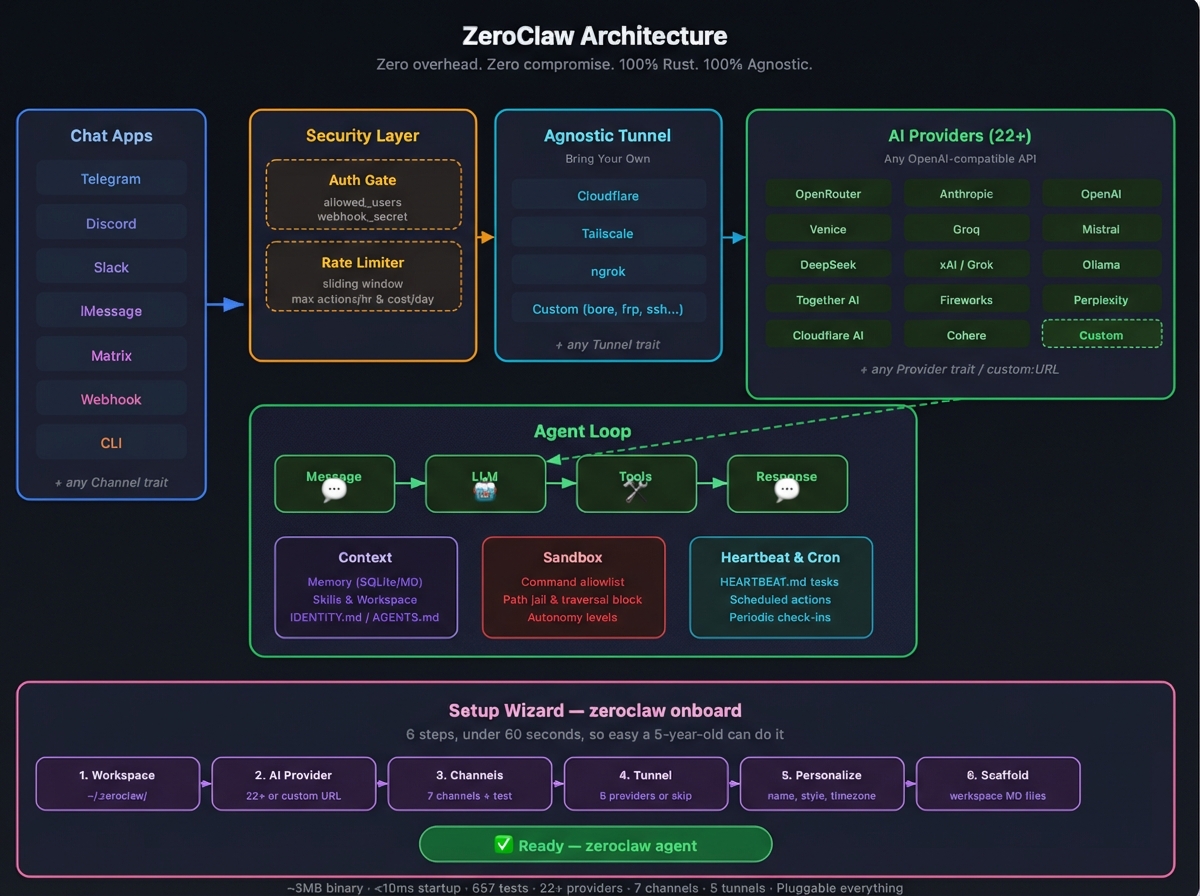
| Subsystem | Trait | Ships with | Extend |
|---|---|---|---|
| AI Models | Provider |
22+ providers (OpenRouter, Anthropic, OpenAI, Ollama, Venice, Groq, Mistral, xAI, DeepSeek, Together, Fireworks, Perplexity, Cohere, Bedrock, etc.) | custom:https://your-api.com — any OpenAI-compatible API |
| Channels | Channel |
CLI, Telegram, Discord, Slack, iMessage, Matrix, Webhook | Any messaging API |
| Memory | Memory |
SQLite with hybrid search (FTS5 + vector cosine similarity), Markdown | Any persistence backend |
| Tools | Tool |
shell, file_read, file_write, memory_store, memory_recall, memory_forget | Any capability |
| Observability | Observer |
Noop, Log, Multi | Prometheus, OTel |
| Runtime | RuntimeAdapter |
Native (Mac/Linux/Pi) | Docker, WASM |
| Security | SecurityPolicy |
Gateway pairing, sandbox, allowlists, rate limits, filesystem scoping | — |
| Tunnel | Tunnel |
None, Cloudflare, Tailscale, ngrok, Custom | Any tunnel binary |
| Heartbeat | Engine | HEARTBEAT.md periodic tasks | — |
| Skills | Loader | TOML manifests + SKILL.md instructions | Community skill packs |
| Integrations | Registry | 50+ integrations across 9 categories | Plugin system |
Memory System
ZeroClaw has a built-in brain. The agent automatically:
- Recalls relevant memories before each prompt (hybrid FTS5 + vector search with context injection)
- Saves conversation turns to memory (auto-save with embeddings)
- Manages its own memory via tools (store/recall/forget)
The default SQLite backend includes:
- FTS5 full-text search with BM25 ranking for keyword queries
- Vector embeddings (OpenAI or pluggable) with cosine similarity for semantic search
- Hybrid merge — weighted combination of keyword + vector results (configurable: 0.3/0.7 default)
- Embedding cache with LRU eviction (default: 10,000 entries)
- Markdown-aware chunking — splits documents by headings, respects token limits
- LIKE fallback when FTS5 and vector return no results
- Upsert, delete, reindex — full CRUD with automatic embedding refresh
Markdown backend available for human-readable, append-only, git-friendly storage.
Switch with one config line:
[memory]
backend = "sqlite"          # "sqlite", "markdown", "none"
auto_save = true
embedding_provider = "openai"
vector_weight = 0.7
keyword_weight = 0.3
Security
ZeroClaw enforces security at every layer — not just the sandbox. It passes all items from the community security checklist.
Security Checklist
| # | Item | Status | How |
|---|---|---|---|
| 1 | Gateway not publicly exposed | ✅ | Binds 127.0.0.1 by default. Refuses 0.0.0.0 without tunnel or explicit allow_public_bind = true. |
| 2 | Pairing required | ✅ | 6-digit one-time code on startup. Exchange via POST /pair for bearer token. All /webhook requests require Authorization: Bearer <token>. |
| 3 | Filesystem scoped (no /) | ✅ | workspace_only = true by default. 14 system dirs + 4 sensitive dotfiles blocked. Null byte injection blocked. Symlink escape detection via canonicalization. |
| 4 | Access via tunnel only | ✅ | Gateway refuses public bind without active tunnel. Supports Tailscale, Cloudflare, ngrok, or any custom tunnel. |
Run your own nmap:
nmap -p 1-65535 <your-host>— ZeroClaw binds to localhost only, so nothing is exposed unless you explicitly configure a tunnel.
Layer 1: Gateway Hardening
# Default — localhost only, pairing required
zeroclaw gateway

# Random port — OS assigns ephemeral port (49152-65535)
zeroclaw gateway --port 0

# With tunnel — public access via secure tunnel only
zeroclaw gateway  # with [tunnel] configured
On startup, the gateway prints a 6-digit pairing code:
🔐 PAIRING REQUIRED — use this one-time code:
   ┌──────────────┐
   │  482917  │
   └──────────────┘
   Send: POST /pair with header X-Pairing-Code: 482917
After pairing, all subsequent requests use Authorization: Bearer zc_<token>.
[gateway]
require_pairing = true      # default: true
allow_public_bind = false   # default: false — NEVER set true without tunnel
Layer 2: Channel Authentication
Every channel validates the sender before the message reaches the agent loop:
| Channel | Auth Method | Config |
|---|---|---|
| Telegram | allowed_users list (username match) |
[channels.telegram] allowed_users |
| Discord | allowed_users list (user ID match) |
[channels.discord] allowed_users |
| Slack | allowed_users list (user ID match) |
[channels.slack] allowed_users |
| Matrix | allowed_users list (MXID match) |
[channels.matrix] allowed_users |
| iMessage | allowed_contacts list |
[channels.imessage] allowed_contacts |
| Webhook | X-Webhook-Secret header (shared secret) |
[channels.webhook] secret |
| CLI | Local-only (inherently trusted) | — |
Note: An empty
allowed_userslist or["*"]allows all users (open mode). Set specific IDs for production.
Layer 3: Rate Limiting
- Sliding-window tracker — counts actions within a 1-hour rolling window
max_actions_per_hour— hard cap on tool executions (default: 20)max_cost_per_day_cents— daily cost ceiling (default: $5.00)
Layer 4: Filesystem Sandbox
- Workspace-only mode (default) — all paths must be relative to workspace
- 14 system directories blocked —
/etc,/root,/home,/usr,/bin,/sbin,/lib,/opt,/boot,/dev,/proc,/sys,/var,/tmp - 4 sensitive dotfiles blocked —
~/.ssh,~/.gnupg,~/.aws,~/.config - Null byte injection — blocked at the path validation layer
- Path traversal —
..in any position is rejected - Symlink escape detection —
is_resolved_path_allowed()verifies canonicalized paths stay inside workspace - Command allowlisting — only approved shell commands (
git,cargo,ls, etc.) - Autonomy levels —
ReadOnly,Supervised(default),Full
Layer 5: Secure Tunnels
Expose your gateway securely — bring your own tunnel provider:
| Provider | Binary | Use Case |
|---|---|---|
| none | — | Local-only (default) |
| cloudflare | cloudflared |
Cloudflare Zero Trust tunnel |
| tailscale | tailscale |
Tailnet-only (serve) or public (funnel) |
| ngrok | ngrok |
Quick public URLs, custom domains |
| custom | Any | Bring your own: bore, frp, ssh, WireGuard, etc. |
[tunnel]
provider = "tailscale"   # "none", "cloudflare", "tailscale", "ngrok", "custom"

[tunnel.tailscale]
funnel = true            # true = public internet, false = tailnet only

# Or use Cloudflare:
# [tunnel]
# provider = "cloudflare"
# [tunnel.cloudflare]
# token = "your-tunnel-token"

# Or ngrok:
# [tunnel]
# provider = "ngrok"
# [tunnel.ngrok]
# auth_token = "your-ngrok-token"
# domain = "my-zeroclaw.ngrok.io"  # optional

# Or bring your own:
# [tunnel]
# provider = "custom"
# [tunnel.custom]
# start_command = "bore local {port} --to bore.pub"
# url_pattern = "https://"         # regex to extract URL from stdout
# health_url = "http://localhost:4040/api/tunnels"  # optional
The tunnel starts automatically with zeroclaw gateway and prints the public URL.
Configuration
Config: ~/.zeroclaw/config.toml (created by onboard)
api_key = "sk-..."
default_provider = "openrouter"
default_model = "anthropic/claude-sonnet-4-20250514"
default_temperature = 0.7

[memory]
backend = "sqlite"              # "sqlite", "markdown", "none"
auto_save = true
embedding_provider = "openai"   # "openai", "noop"
vector_weight = 0.7
keyword_weight = 0.3

[gateway]
require_pairing = true          # require pairing code on first connect
allow_public_bind = false       # refuse 0.0.0.0 without tunnel

[autonomy]
level = "supervised"            # "readonly", "supervised", "full"
workspace_only = true
allowed_commands = ["git", "npm", "cargo", "ls", "cat", "grep"]
forbidden_paths = ["/etc", "/root", "/proc", "/sys", "~/.ssh", "~/.gnupg", "~/.aws"]

[heartbeat]
enabled = false
interval_minutes = 30

[tunnel]
provider = "none"               # "none", "cloudflare", "tailscale", "ngrok", "custom"
Gateway API
| Endpoint | Method | Auth | Description |
|---|---|---|---|
/health |
GET | None | Health check (always public, no secrets leaked) |
/pair |
POST | X-Pairing-Code header |
Exchange one-time code for bearer token |
/webhook |
POST | Authorization: Bearer <token> |
Send message: {"message": "your prompt"} |
Random Port Mode
Use --port 0 for OS-assigned random ephemeral ports (security hardening against port scanning):
zeroclaw gateway --port 0
# Output: 🦀 ZeroClaw Gateway listening on http://127.0.0.1:54321 (random port)
The actual port is printed on startup and passed to the tunnel system automatically.
Commands
| Command | Description |
|---|---|
onboard |
Interactive setup wizard |
agent -m "..." |
Single message mode |
agent |
Interactive chat mode |
gateway |
Start webhook server (default: 127.0.0.1:8080) |
gateway --port 0 |
Random port mode |
status -v |
Show full system status |
tools list |
List all 6 tools |
tools test <name> <json> |
Test a tool directly |
integrations list |
List all 50+ integrations |
Documentation Index
Fetch the complete documentation index at: https://docs.openclaw.ai/llms.txt Use this file to discover all available pages before exploring further.
Token Use & Costs
ZeroClaw tracks tokens, not characters. Tokens are model-specific, but most OpenAI-style models average ~4 characters per token for English text.
How the system prompt is built
ZeroClaw assembles its own system prompt on every run. It includes:
- Tool list + short descriptions
- Skills list (only metadata; instructions are loaded on demand with
read) - Safety guardrails
- Workspace + bootstrap files (
AGENTS.md,SOUL.md,TOOLS.md,IDENTITY.md,USER.md,HEARTBEAT.md,BOOTSTRAP.mdwhen new, plusMEMORY.md). Large files are truncated at 20,000 characters.memory/*.mdfiles are on-demand via memory tools and are not auto-injected. - Time (UTC + user timezone)
- Runtime metadata (host/OS/model)
What counts in the context window
Everything the model receives counts toward the context limit:
- System prompt (all sections listed above)
- Conversation history (user + assistant messages)
- Tool calls and tool results
- Memory context (injected before each prompt via hybrid recall)
- Provider wrappers or safety headers (not visible, but still counted)
Tips for reducing token pressure
- Use smaller models for verbose, exploratory work
- Trim large tool outputs in your workflows
- Keep skill descriptions short (skill list is injected into the prompt)
- Adjust
auto_saveto avoid excessive memory growth
Development
cargo build              # Dev build
cargo build --release    # Release build (~3.4MB)
cargo test               # 943 tests
cargo clippy             # Lint (0 warnings)
cargo fmt                # Format

# Run the SQLite vs Markdown benchmark
cargo test --test memory_comparison -- --nocapture
Test Coverage
| Module | Tests | Covers |
|---|---|---|
| Memory (SQLite) | 100+ | FTS5, vector search, hybrid merge, embeddings, chunker, SQL injection, unicode |
| Security (Policy) | 50+ | Path traversal, null bytes, forbidden dirs, workspace scoping, symlink escapes |
| Security (Pairing) | 20+ | Code generation, token issuance, constant-time comparison, replay prevention |
| Gateway | 20+ | Port 0, random port allocation, header extraction, port conflicts |
| Config | 30+ | Serde roundtrip, backward compat, secure defaults, gateway config |
| Providers | 30+ | Factory, custom URLs, auth styles |
| Tools | 20+ | Schema validation, tool specs, serde |
| Integrations | 15+ | Registry completeness, status functions, categories |
| Tunnel | 20+ | Factory, constructors, async behavior |
Project Structure
src/
├── main.rs              # CLI (clap) — 10 subcommands
├── lib.rs               # Library exports (8 modules)
├── agent/               # Agent loop + memory context injection
│   ├── mod.rs
│   └── loop_.rs
├── channels/            # Channel trait + 7 implementations
│   ├── traits.rs        # Channel trait definition
│   ├── cli.rs           # Local terminal
│   ├── telegram.rs      # Telegram Bot API
│   ├── discord.rs       # Discord bot
│   ├── slack.rs         # Slack bot
│   ├── matrix.rs        # Matrix protocol
│   ├── imessage.rs      # macOS iMessage
│   └── mod.rs           # System prompt builder
├── config/              # TOML config schema
│   ├── schema.rs        # All config structs + defaults
│   └── mod.rs
├── cron/                # Scheduled tasks
├── gateway/             # HTTP gateway (raw TCP + tokio)
│   └── mod.rs           # /health, /pair, /webhook endpoints
├── heartbeat/           # Periodic task engine
│   ├── engine.rs
│   └── mod.rs
├── integrations/        # 50+ integration registry
│   ├── registry.rs      # All integrations across 9 categories
│   └── mod.rs
├── memory/              # Memory trait + hybrid search engine
│   ├── traits.rs        # Memory trait definition
│   ├── sqlite.rs        # SQLite + FTS5 + vector embeddings
│   ├── markdown.rs      # Append-only markdown
│   ├── embeddings.rs    # EmbeddingProvider trait + OpenAI + Noop
│   ├── vector.rs        # Cosine similarity + serialization + hybrid merge
│   ├── chunker.rs       # Markdown-aware document splitting
│   └── mod.rs           # Factory
├── observability/       # Observer trait + 3 backends
│   ├── traits.rs
│   ├── noop.rs
│   ├── log.rs
│   └── multi.rs
├── onboard/             # Interactive setup wizard
│   └── wizard.rs
├── providers/           # Provider trait + 22+ providers
│   ├── traits.rs        # Provider trait definition
│   ├── openrouter.rs    # OpenRouter (default)
│   ├── anthropic.rs     # Anthropic direct
│   ├── openai.rs        # OpenAI direct
│   ├── ollama.rs        # Local Ollama
│   ├── compatible.rs    # OpenAI-compatible adapter (18+ providers)
│   └── mod.rs           # Factory
├── runtime/             # RuntimeAdapter trait + Native
│   ├── traits.rs
│   └── native.rs
├── security/            # Security policy + gateway pairing
│   ├── policy.rs        # SecurityPolicy, path validation, rate limiting
│   ├── pairing.rs       # PairingGuard, OTP, bearer tokens
│   └── mod.rs
├── skills/              # Skill loader (TOML manifests)
│   └── mod.rs
├── tools/               # Tool trait + 6 tools
│   ├── traits.rs        # Tool trait definition
│   ├── shell.rs         # Shell command execution
│   ├── file_read.rs     # Sandboxed file reading
│   ├── file_write.rs    # Sandboxed file writing
│   ├── memory_store.rs  # Store to memory
│   ├── memory_recall.rs # Search memory
│   ├── memory_forget.rs # Delete from memory
│   └── mod.rs           # Registry
└── tunnel/              # Tunnel trait + 5 implementations
    ├── none.rs          # Local-only (default)
    ├── cloudflare.rs    # Cloudflare Zero Trust
    ├── tailscale.rs     # Tailscale serve/funnel
    ├── ngrok.rs         # ngrok
    ├── custom.rs        # Bring your own
    └── mod.rs           # Factory

examples/
├── custom_provider.rs
├── custom_channel.rs
├── custom_tool.rs
└── custom_memory.rs

tests/
└── memory_comparison.rs  # SQLite vs Markdown benchmark
62 source files · 16,500 lines of Rust · 943 tests · 0 clippy warnings
License
MIT — see LICENSE
Contributing
See CONTRIBUTING.md. Implement a trait, submit a PR:
- New
Provider→src/providers/ - New
Channel→src/channels/ - New
Observer→src/observability/ - New
Tool→src/tools/ - New
Memory→src/memory/ - New
Tunnel→src/tunnel/ - New
Skill→~/.zeroclaw/workspace/skills/<name>/
ZeroClaw — Zero overhead. Zero compromise. Deploy anywhere. Swap anything. 🦀